
 ภาษาไทย
 English
  اللغة العربية
  Bahasa Indonesia
  日本語
日本語  Bahasa Melayu
  Tiếng Việt
  简体中文
简体中文 ก่อนหน้านี้ มีผู้ใช้จำนวนมากให้ฟีดแบ็กกับเรา โดยหวังว่า DingTalk จะ推出ฟังก์ชันคล้ายกับ TeamViewer ซึ่งช่วยให้สามารถตรวจสอบและแก้ไขปัญหาได้จากระยะไกล
DingTalk ได้ "รับฟังความคิดเห็น" และในครั้งนี้ได้เปิดตัวสองฟีดเจอร์ใหม่สำหรับการประชุมวิดีโอ: การควบคุมระยะไกลและการเข้าร่วมจากหลายอุปกรณ์ เพื่อมอบประสบการณ์ทำงานร่วมกันจากระยะไกลที่ดีขึ้นให้กับผู้ใช้
เครื่องมือเพิ่มประสิทธิภาพที่ดีเพียงหนึ่งเดียวคือ DingTalk ตอนนี้ มาใช้งานไปพร้อมกันเลย~
ควบคุมคอมพิวเตอร์ระยะไกล
การแก้ไขปัญหาง่ายขึ้นและมีประสิทธิภาพมากขึ้น
ในการทำงาน ไม่รู้ว่าคุณเคยเจอสถานการณ์ที่น่าหนักใจเหล่านี้หรือไม่:
ระบบคอมพิวเตอร์หรือซอฟต์แวร์เกิดปัญหาขึ้นมาแบบไม่ทันตั้งตัว ต้องขอความช่วยเหลือจากคนที่อยู่ไกลเพื่อตรวจสอบและแก้ไข แต่ก็หาปุ่มต่าง ๆ ที่เขาบอกไม่เจอเสียที
จำเป็นต้องทำงานล่วงเวลาแบบฉุกเฉิน แต่กลับลืมคอมพิวเตอร์มาที่บ้าน ต้องขอให้เพื่อนร่วมงานช่วยเปิดคอมและส่งไฟล์ให้ แต่เพื่อนร่วมงานก็หาตั้งนานไม่เจอ
……
เพื่อแก้ปัญหาความ "ไม่รู้วิธีใช้งาน" และ "หาไม่เจอ" นี้ DingTalk Meeting ได้เปิดตัวฟีดเจอร์ "การควบคุมระยะไกล" สำหรับเวอร์ชันเดสก์ท็อป ซึ่งอนุญาตให้อีกฝ่ายสามารถควบคุมคอมพิวเตอร์ของคุณได้โดยตรง เหมาะสำหรับการแก้ไขปัญหาหรือค้นหาข้อมูล
ฟีดเจอร์นี้ไม่เพียงแต่มี延迟ต่ำและภาพคมชัด แต่ยังใช้งานง่ายมาก แค่มี DingTalk อย่างเดียวก็足够了
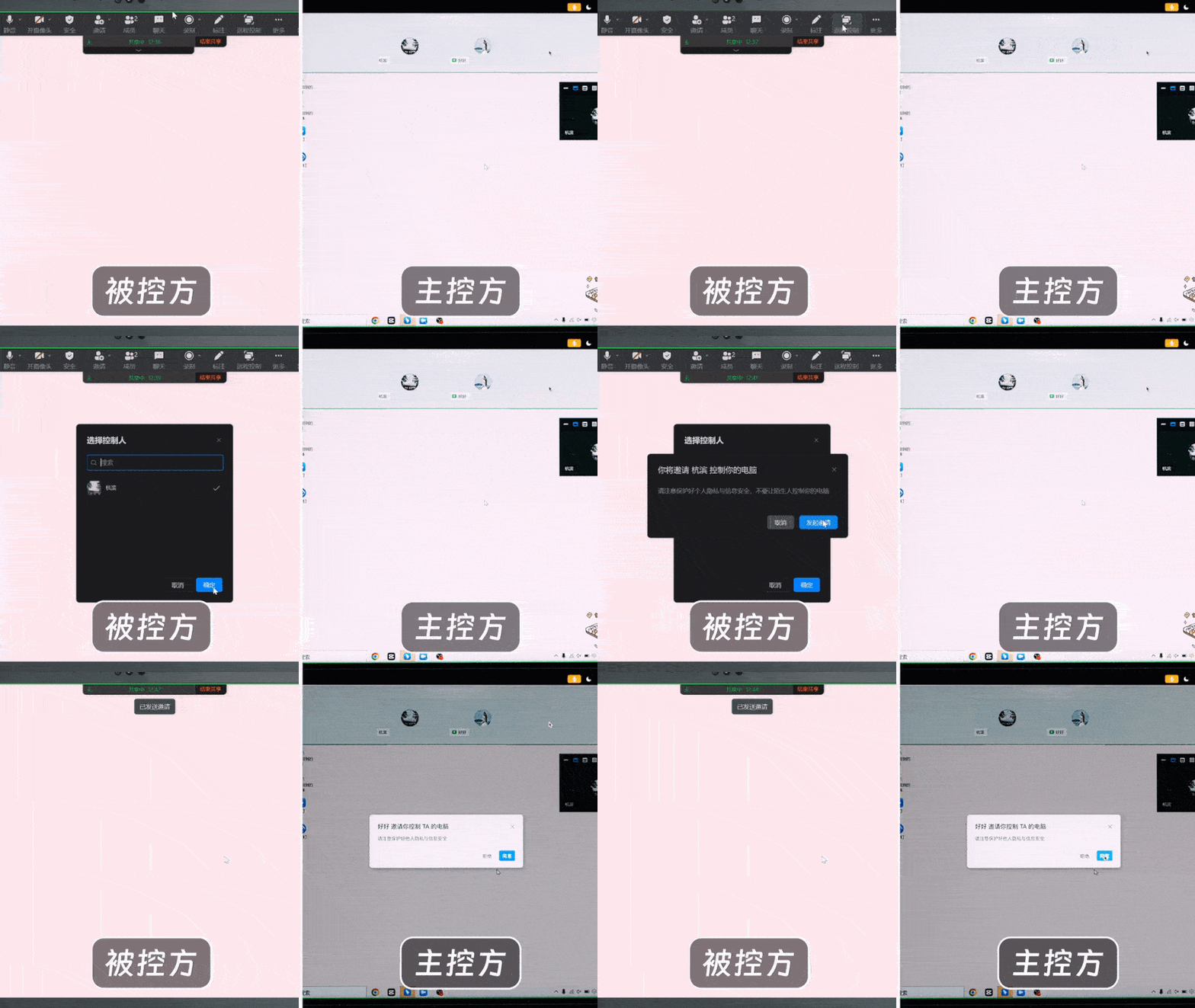
ขั้นตอนแรก
เปิด DingTalk Meeting รอให้อีกฝ่ายเข้าร่วม จากนั้นเปิดการแชร์หน้าจอและเลือกโหมด "เดสก์ท็อป"
ขั้นตอนที่สอง
คลิกปุ่ม "ควบคุมระยะไกล" ในแถบเครื่องมือแชร์ด้านบน แล้วเชิญอีกฝ่าย เมื่อได้รับความยินยอมแล้ว ก็สามารถมอบสิทธิ์การควบคุมหน้าจอคอมพิวเตอร์ให้กับอีกฝ่ายได้ ช่วยชีวิตคุณในยามคับขันได้จริงๆ!
❗️ ข้อควรระวัง: เมื่อใช้ฟีดเจอร์ควบคุมระยะไกล ควรคำนึงถึงความเสี่ยงด้านความปลอดภัย ตรวจสอบให้แน่ใจ
Using DingTalk: Before & After
Before
- × Team Chaos: Team members are all busy with their own tasks, standards are inconsistent, and the more communication there is, the more chaotic things become, leading to decreased motivation.
- × Info Silos: Important information is scattered across WhatsApp/group chats, emails, Excel spreadsheets, and numerous apps, often resulting in lost, missed, or misdirected messages.
- × Manual Workflow: Tasks are still handled manually: approvals, scheduling, repair requests, store visits, and reports are all slow, hindering frontline responsiveness.
- × Admin Burden: Clocking in, leave requests, overtime, and payroll are handled in different systems or calculated using spreadsheets, leading to time-consuming statistics and errors.
After
- ✓ Unified Platform: By using a unified platform to bring people and tasks together, communication flows smoothly, collaboration improves, and turnover rates are more easily reduced.
- ✓ Official Channel: Information has an "official channel": whoever is entitled to see it can see it, it can be tracked and reviewed, and there's no fear of messages being skipped.
- ✓ Digital Agility: Processes run online: approvals are faster, tasks are clearer, and store/on-site feedback is more timely, directly improving overall efficiency.
- ✓ Automated HR: Clocking in, leave requests, and overtime are automatically summarized, and attendance reports can be exported with one click for easy payroll calculation.
Operate smarter, spend less
Streamline ops, reduce costs, and keep HQ and frontline in sync—all in one platform.
9.5x
Operational efficiency
72%
Cost savings
35%
Faster team syncs
Want to a Free Trial? Please book our Demo meeting with our AI specilist as below link:
https://www.dingtalk-global.com/contact
