
 English
 اللغة العربية
  Bahasa Indonesia
  日本語
日本語  Bahasa Melayu
  ภาษาไทย
  Tiếng Việt
  简体中文
简体中文 Previously, many users provided feedback hoping that DingTalk would introduce features similar to TeamViewer's remote assistance for troubleshooting issues remotely. DingTalk "took the advice" and has now launched two major new video conferencing features: remote control and multi-device joining, offering users a better remote collaboration experience. A single DingTalk is all you need for powerful productivity tools. Now, follow along and give them a try~
Previously, many users provided feedback hoping that DingTalk would introduce features similar to TeamViewer's remote assistance for troubleshooting issues remotely.
DingTalk "took the advice" and has now launched two major new video conferencing features: remote control and multi-device joining, offering users a better remote collaboration experience.
A single DingTalk is all you need for powerful productivity tools. Now, follow along and give them a try~
Remote Computer Control
Easier and More Efficient Troubleshooting
At work, have you ever encountered these frustrating situations:
Your computer system or software suddenly malfunctions, and you seek remote help to troubleshoot, but it takes forever to locate the various buttons they mention;
You need to work overtime unexpectedly and didn’t bring your computer home, so you ask a colleague to help turn on your computer to send files, but they can’t find them after searching forever;
……
To solve these "can't operate" and "can't find" frustrations, DingTalk Meetings has introduced the "Remote Control" feature for desktop, allowing others to directly operate your computer for troubleshooting or finding files.
This feature not only offers low latency and clear visuals but is also very simple to use—all within DingTalk.
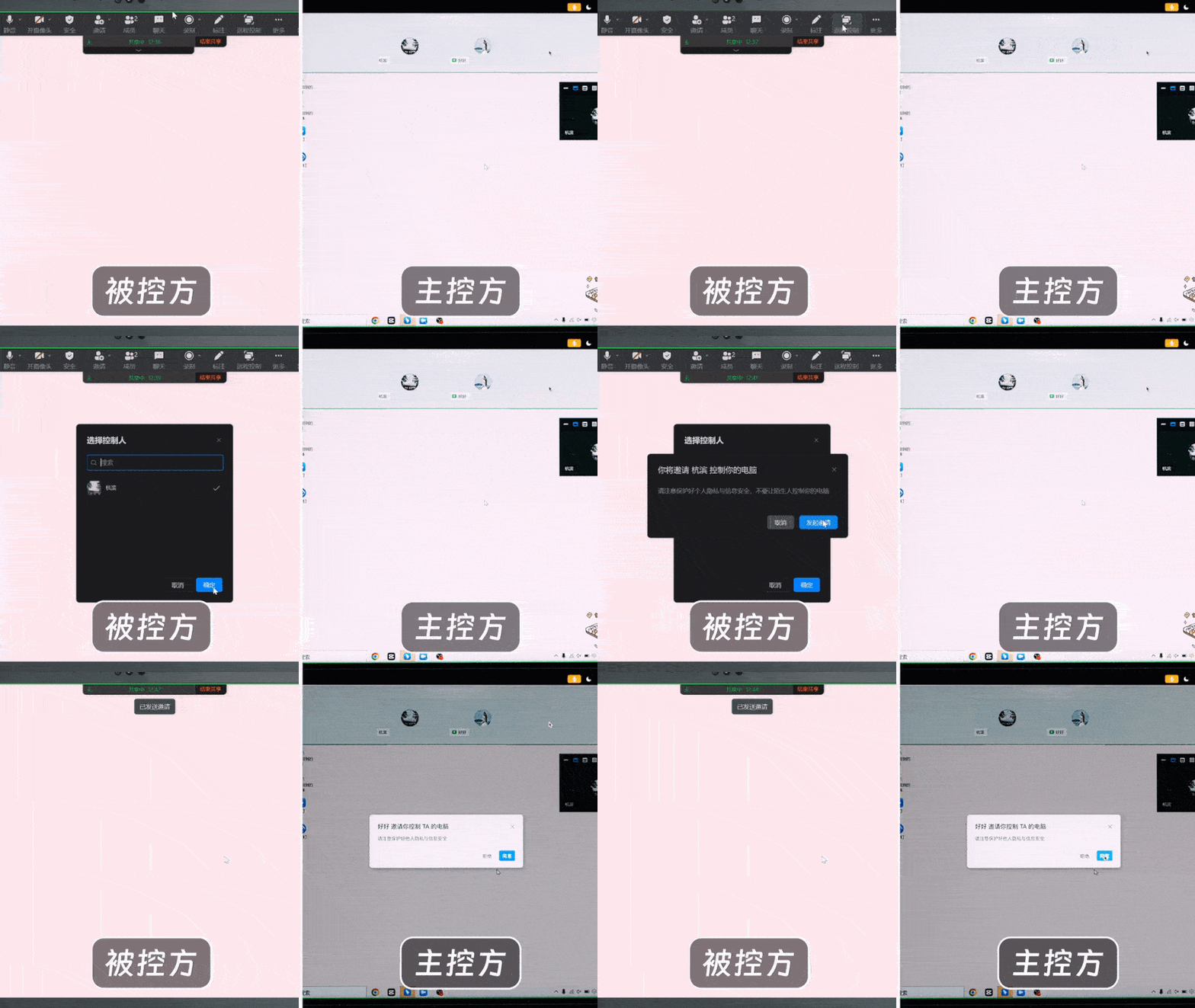
Step 1
Open DingTalk Meetings, wait for the other party to join, then enable screen sharing and select "Desktop" mode.
Step 2
Click the "Remote Control" button in the sharing toolbar at the top of the interface. After inviting the other party and obtaining their consent, you can hand over control of your computer screen to them. This can be a lifesaver in critical moments!
❗️ Quick Tip: When using the remote control feature, be mindful of security risks. Ensure the other party is within the same organization and trustworthy, and never share sensitive information!
Multi-Device Meeting Joining
More Flexible and Immersive Online Collaboration
In addition to remote control, DingTalk Meetings has also introduced the "Multi-Device Joining" feature, allowing the same account to join a meeting simultaneously on mobile, desktop, and tablet for an immersive collaboration experience.
Common usage scenarios include:
In the middle of a meeting, you need to step away from your desk to grab a coffee—joining simultaneously on your mobile avoids switching devices and ensures you don’t miss important content;
Using a desktop computer for a meeting but lacking headphones or finding the mobile PPT experience subpar? Join on both devices: view the shared PPT on your desktop while speaking freely via mobile;
In design collaboration scenarios, using a mouse to draw on a computer is inefficient. Directly annotating with a stylus on a tablet is more precise, enabling the perfect combo of "tablet collaboration + mobile communication";
......
Currently, this feature supports up to 5 devices per account simultaneously joining a meeting. After joining on one device, simply select "Join with Multiple Devices" on another to enable it.

Have you learned how to use these two new DingTalk Meetings features?
Go give them a try now!
Using DingTalk: Before & After
Before
- × Team Chaos: Team members are all busy with their own tasks, standards are inconsistent, and the more communication there is, the more chaotic things become, leading to decreased motivation.
- × Info Silos: Important information is scattered across WhatsApp/group chats, emails, Excel spreadsheets, and numerous apps, often resulting in lost, missed, or misdirected messages.
- × Manual Workflow: Tasks are still handled manually: approvals, scheduling, repair requests, store visits, and reports are all slow, hindering frontline responsiveness.
- × Admin Burden: Clocking in, leave requests, overtime, and payroll are handled in different systems or calculated using spreadsheets, leading to time-consuming statistics and errors.
After
- ✓ Unified Platform: By using a unified platform to bring people and tasks together, communication flows smoothly, collaboration improves, and turnover rates are more easily reduced.
- ✓ Official Channel: Information has an "official channel": whoever is entitled to see it can see it, it can be tracked and reviewed, and there's no fear of messages being skipped.
- ✓ Digital Agility: Processes run online: approvals are faster, tasks are clearer, and store/on-site feedback is more timely, directly improving overall efficiency.
- ✓ Automated HR: Clocking in, leave requests, and overtime are automatically summarized, and attendance reports can be exported with one click for easy payroll calculation.
Operate smarter, spend less
Streamline ops, reduce costs, and keep HQ and frontline in sync—all in one platform.
9.5x
Operational efficiency
72%
Cost savings
35%
Faster team syncs
Want to a Free Trial? Please book our Demo meeting with our AI specilist as below link:
https://www.dingtalk-global.com/contact
