
 English
 اللغة العربية
  Bahasa Indonesia
  日本語
日本語  Bahasa Melayu
  ภาษาไทย
  Tiếng Việt
  简体中文
简体中文 What is a flowchart? A process refers to a series of continuous and logically ordered activities or steps aimed at accomplishing a specific goal or producing a particular outcome. This concept can be applied to various contexts, including the field of project management. One key characteristic of a process is its "sequentiality." That is, steps within a process are arranged in a specific order, and the execution of each step usually depends on the completion of the prior step. In Teambition flowcharts, each step in the process is represented as individual tasks. When reading a chart from left to right, the lines connecting the tasks represent the predecessor-successor relationship between these steps. Taking the chart below as an example, tasks such as "Form Project Team," "Project Kickoff Conference," and "Product Design Plan" can only start after the completion of the initial task "Project Kickoff." Also, the task "Phase I Results Delivery" can only begin after tasks "Product Design Plan" and "Project Risk Review" are completed.
⚡️ What is a flowchart?
A process refers to a series of continuous and logically ordered activities or steps aimed at accomplishing a specific goal or producing a particular outcome. This concept can be applied to various contexts, including the field of project management. One key characteristic of a process is its "sequentiality." That is, steps within a process are arranged in a specific order, and the execution of each step usually depends on the completion of the prior step.
In Teambition flowcharts, each step in the process is represented as individual tasks. When reading a chart from left to right, the lines connecting tasks represent the predecessor-successor relationship between steps. Taking the chart below as an example, tasks such as "Form Project Team," "Project Kickoff Conference," and "Product Design Plan" can only start after the completion of the initial task "Project Kickoff." Also, task "Phase I Results Delivery" can only begin after the completion of tasks "Product Design Plan" and "Project Risk Review."
With the Teambition flowchart application, the sequential relationship of tasks is visualized with connecting lines. No matter how complex the project is, it can be clearly and visually presented, helping users to identify and rectify potential problems before implementation and thus plan their work more effectively.

🔑 How to enable the application?
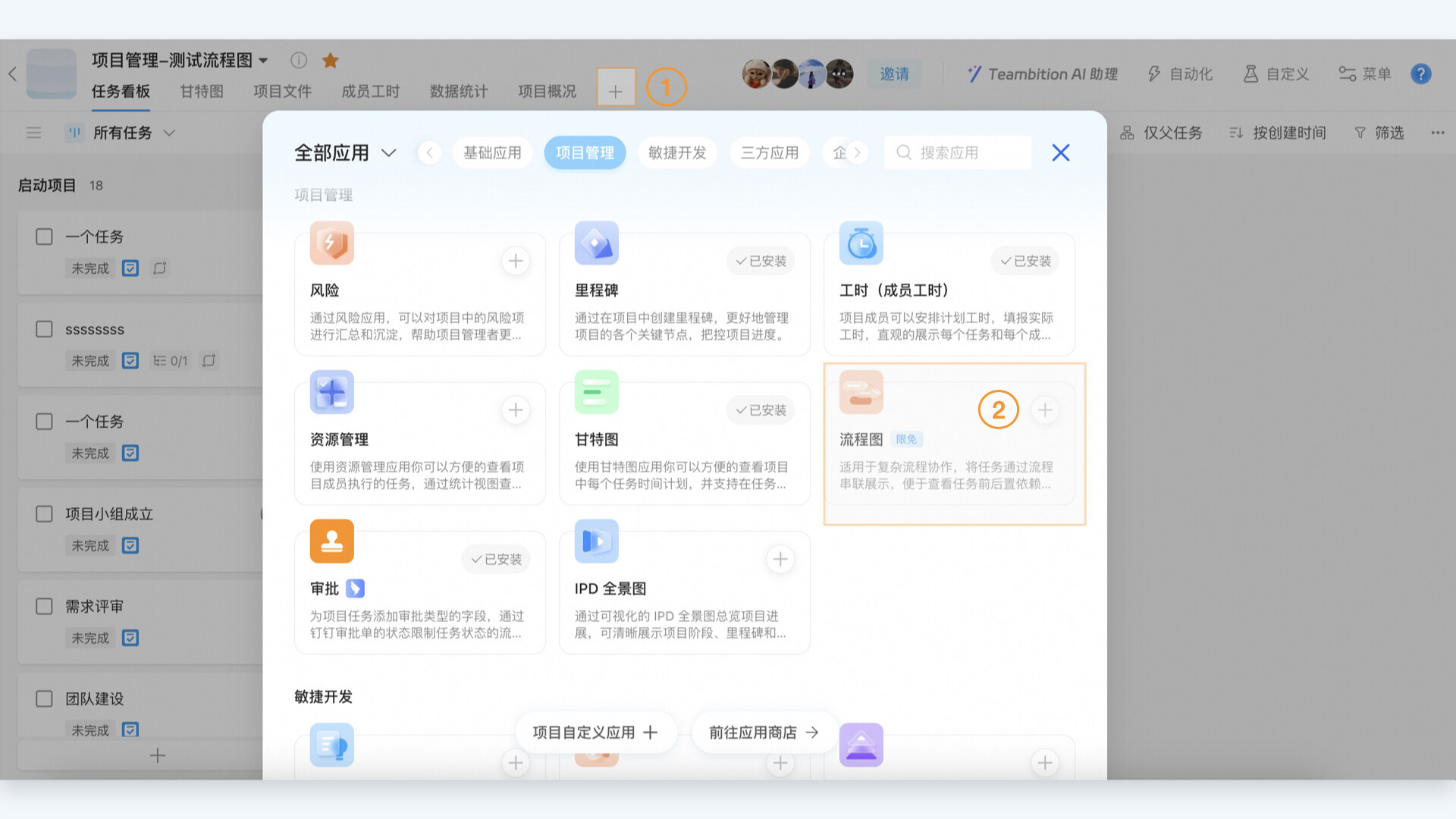
Click on the "+" on the project navigation bar to enter the application center. Find the "Flowchart" application under the "Project Management" category and install it, or directly search for the application in the search box and install it.
🧵 How to configure the process?
Step 1: Initialize the flowchart
If there are already multiple "Finish-Start" dependencies between tasks inside the project, the flowchart application will generate a flowchart upon its first installation.

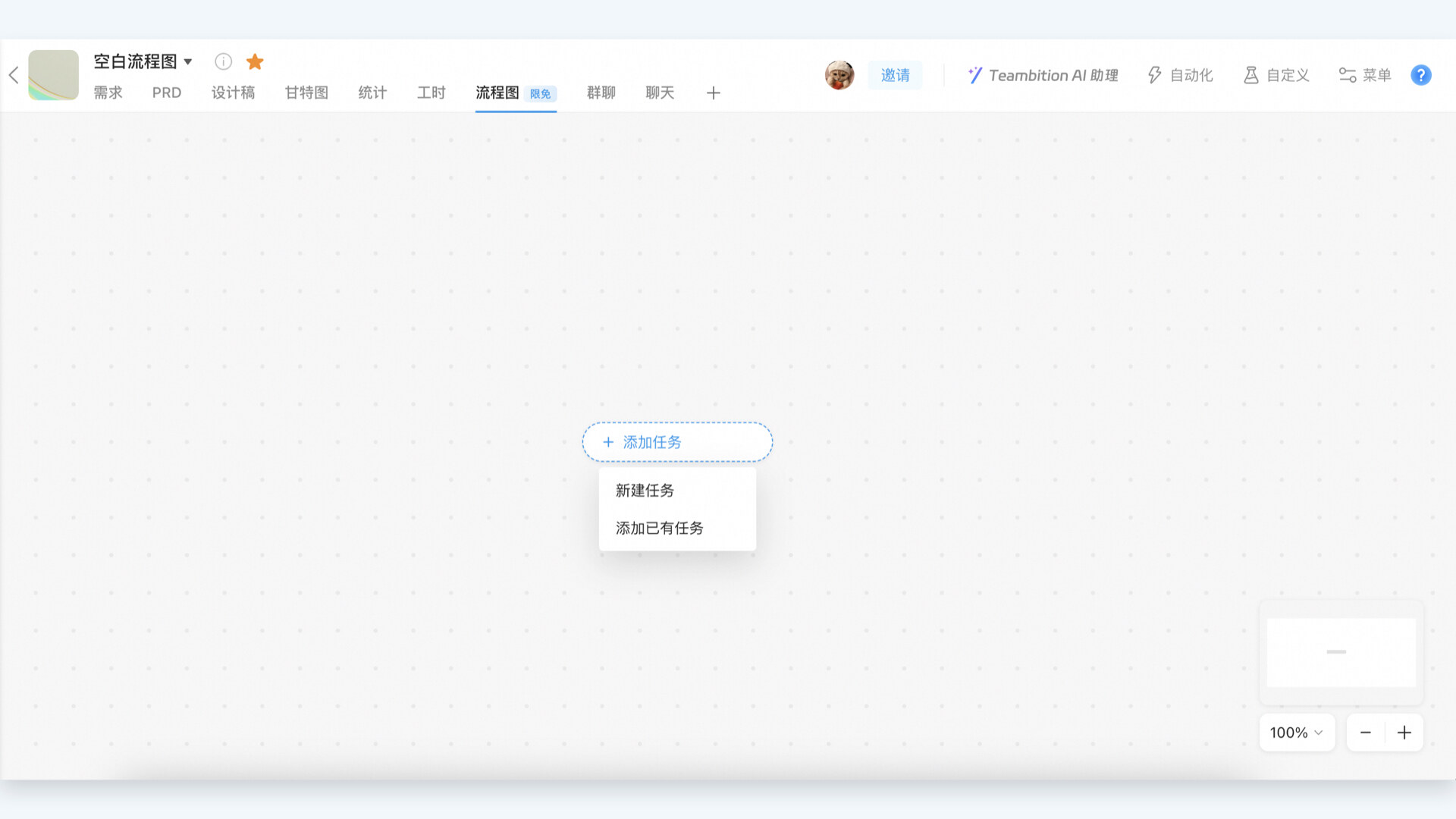
If there are no "Finish-Start" dependencies between tasks within the project, the canvas will be blank after installing the Flowchart application.
Click "Add Task" to manually select or create new tasks and set predecessor-successor dependencies between multiple tasks.
Step 2: Create a new dependency
In the flowchart, there are two methods to set up a "Finish-Start" dependency between tasks.
1. Drag the connection: Move the mouse to the edge of a task on the right side, click the small arrow next to the task, drag the arrow to another task to quickly create a "Finish-Start" dependency between the two tasks.

2. Click the plus sign: Select a specific task and click the "plus" icon next to it. You can then add a successor task, creating a "Finish-Start" dependency relationship.

Step 3: Delete dependency
In the flowchart, select a line connecting tasks, and a delete icon will appear. Clicking on this delete icon will remove the connection between tasks.
It is worth noting that deleting the line only removes the "Finish-Start" dependency between tasks but does not delete the tasks themselves.

DomTech is the official designated service provider of DingTalk in Hong Kong, dedicated to providing DingTalk services to customers. If you want to learn more about DingTalk platform applications please call us at (852)4443-3144 or email
Using DingTalk: Before & After
Before
- × Team Chaos: Team members are all busy with their own tasks, standards are inconsistent, and the more communication there is, the more chaotic things become, leading to decreased motivation.
- × Info Silos: Important information is scattered across WhatsApp/group chats, emails, Excel spreadsheets, and numerous apps, often resulting in lost, missed, or misdirected messages.
- × Manual Workflow: Tasks are still handled manually: approvals, scheduling, repair requests, store visits, and reports are all slow, hindering frontline responsiveness.
- × Admin Burden: Clocking in, leave requests, overtime, and payroll are handled in different systems or calculated using spreadsheets, leading to time-consuming statistics and errors.
After
- ✓ Unified Platform: By using a unified platform to bring people and tasks together, communication flows smoothly, collaboration improves, and turnover rates are more easily reduced.
- ✓ Official Channel: Information has an "official channel": whoever is entitled to see it can see it, it can be tracked and reviewed, and there's no fear of messages being skipped.
- ✓ Digital Agility: Processes run online: approvals are faster, tasks are clearer, and store/on-site feedback is more timely, directly improving overall efficiency.
- ✓ Automated HR: Clocking in, leave requests, and overtime are automatically summarized, and attendance reports can be exported with one click for easy payroll calculation.
Operate smarter, spend less
Streamline ops, reduce costs, and keep HQ and frontline in sync—all in one platform.
9.5x
Operational efficiency
72%
Cost savings
35%
Faster team syncs
Want to a Free Trial? Please book our Demo meeting with our AI specilist as below link:
https://www.dingtalk-global.com/contact
